Olymptrade Deposit and Withdraw in Mexico: Methods & Limits
Writen By

Online Trading Platform Researcher and Guide Writer
Researches broker platforms and trading account Systems.
Funding and cashing out a trading account from Mexico raises specific questions about accepted local channels, currency conversion and payout speed. Many Mexican users need clarity on whether they can use SPEI, OXXO, Mexican-issued cards or international e‑wallets, what minimum amounts apply, and how identity checks affect access to funds. Security checks and mismatched payment details are common causes of hold-ups, so understanding platform funding rules before you start saves time.
This page walks through the practical steps to deposit and withdraw with Olymptrade from Mexico, covering supported payment methods, typical minimums and processing times, verification documents required for payouts, common error messages and basic troubleshooting tips to avoid delays. Expect notes on provider limits, potential fees charged by banks or payment services, currency-conversion handling when depositing in MXN versus USD, and simple best practices to speed approval and make sure withdrawals go back to the same account or card used for funding.
This page walks through the practical steps to deposit and withdraw with Olymptrade from Mexico, covering supported payment methods, typical minimums and processing times, verification documents required for payouts, common error messages and basic troubleshooting tips to avoid delays. Expect notes on provider limits, potential fees charged by banks or payment services, currency-conversion handling when depositing in MXN versus USD, and simple best practices to speed approval and make sure withdrawals go back to the same account or card used for funding.

How to Deposit Money in Olymptrade Mexico
What Payment Methods Can I Use?
There is a unique list of payment methods available for Mexico:
- Bank Cards
- Skrill
- OXXO
- SPEI
- PayNet
- Banorte
- Bancomer
- Azteca
- Scotiabank Mexico
- Circulo K
- Walmart
- Superama
- Sams Club
- 7_Eleven
- Extra
- Calimax
- Soriana
- Commercial Mexicana
- China UnionPay
- AstroPay card
- Neteller
- Perfect Money
- Lunu
- Bitcoin
- Tether
- Ethereum
- WebMoney
How do I make a Deposit in Olymptrade Mexico
Deposit using Desktop
Click the "Payments" button.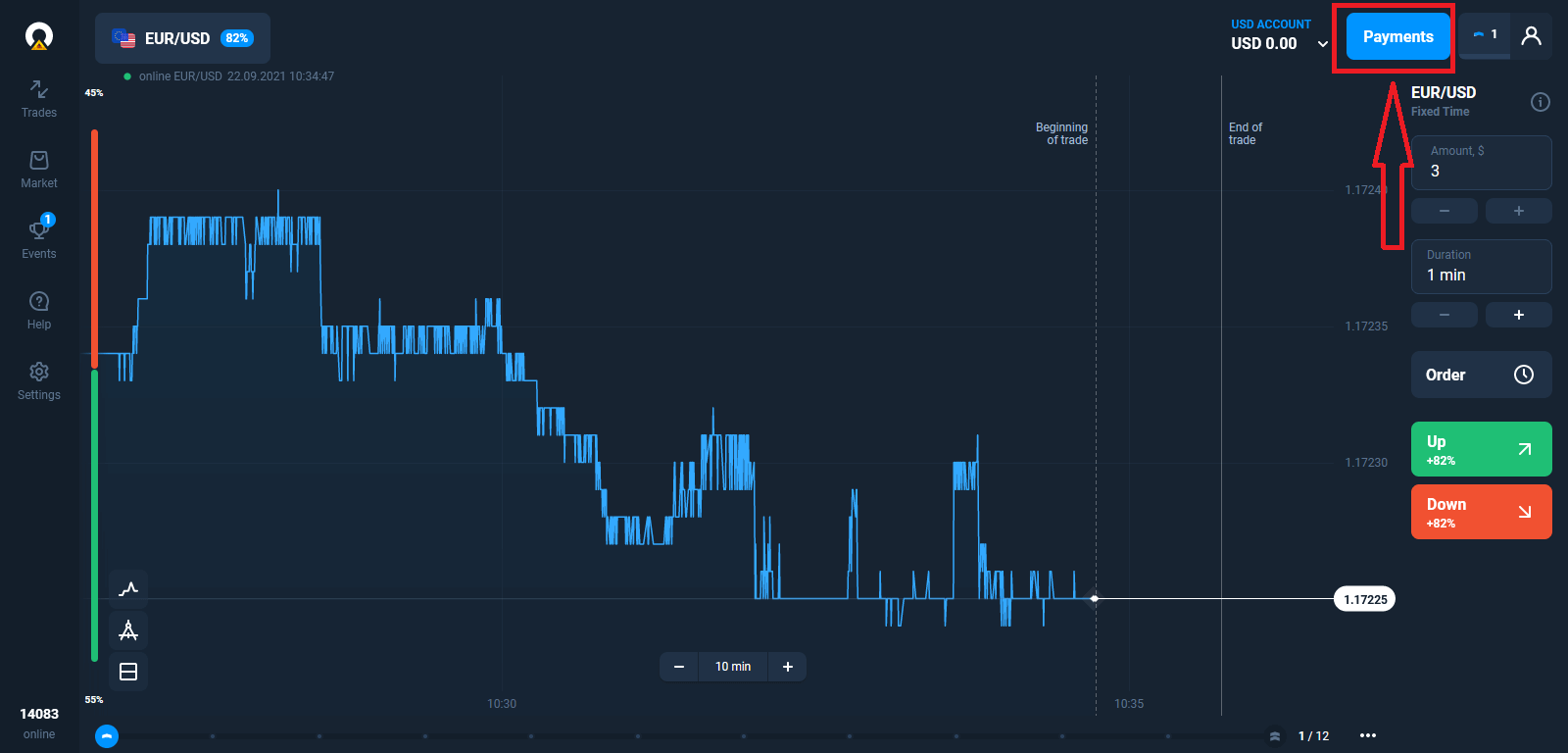
Go to the Deposit page.
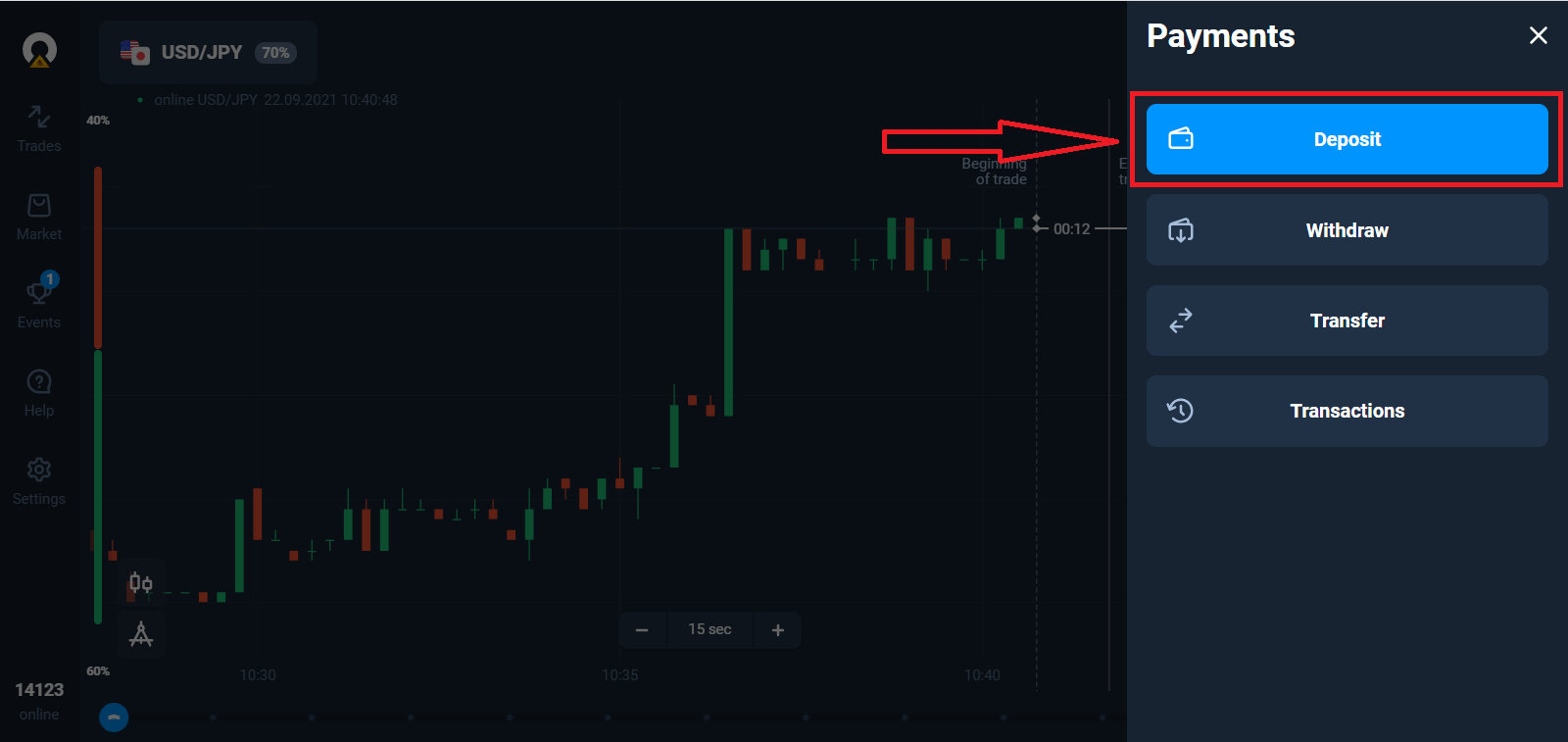
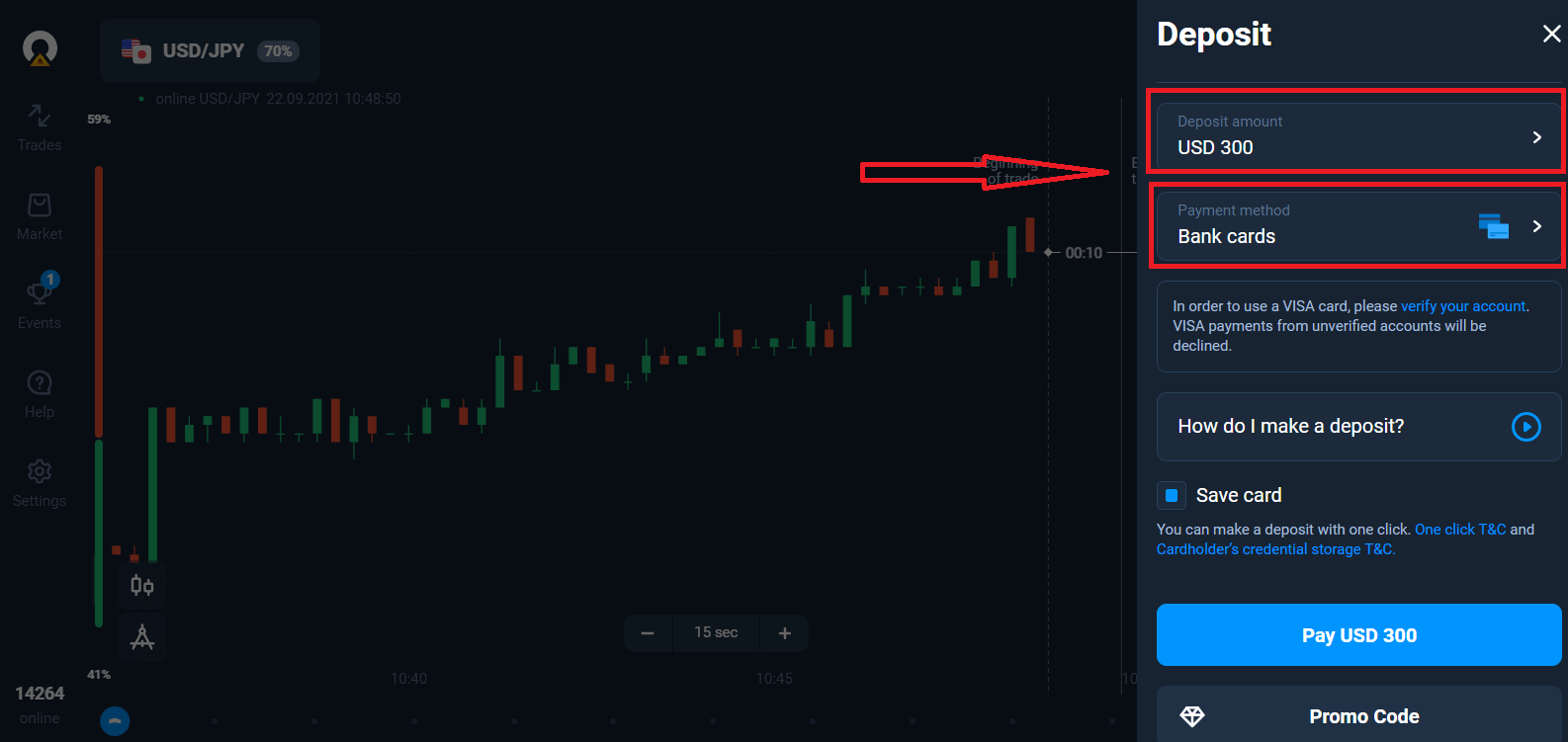
Select a payment method and enter the amount of your deposit. The minimum deposit amount is just $10/€10. However, it may vary for different countries.
The system may offer you a deposit bonus, take advantage of the bonus to increase the deposit.
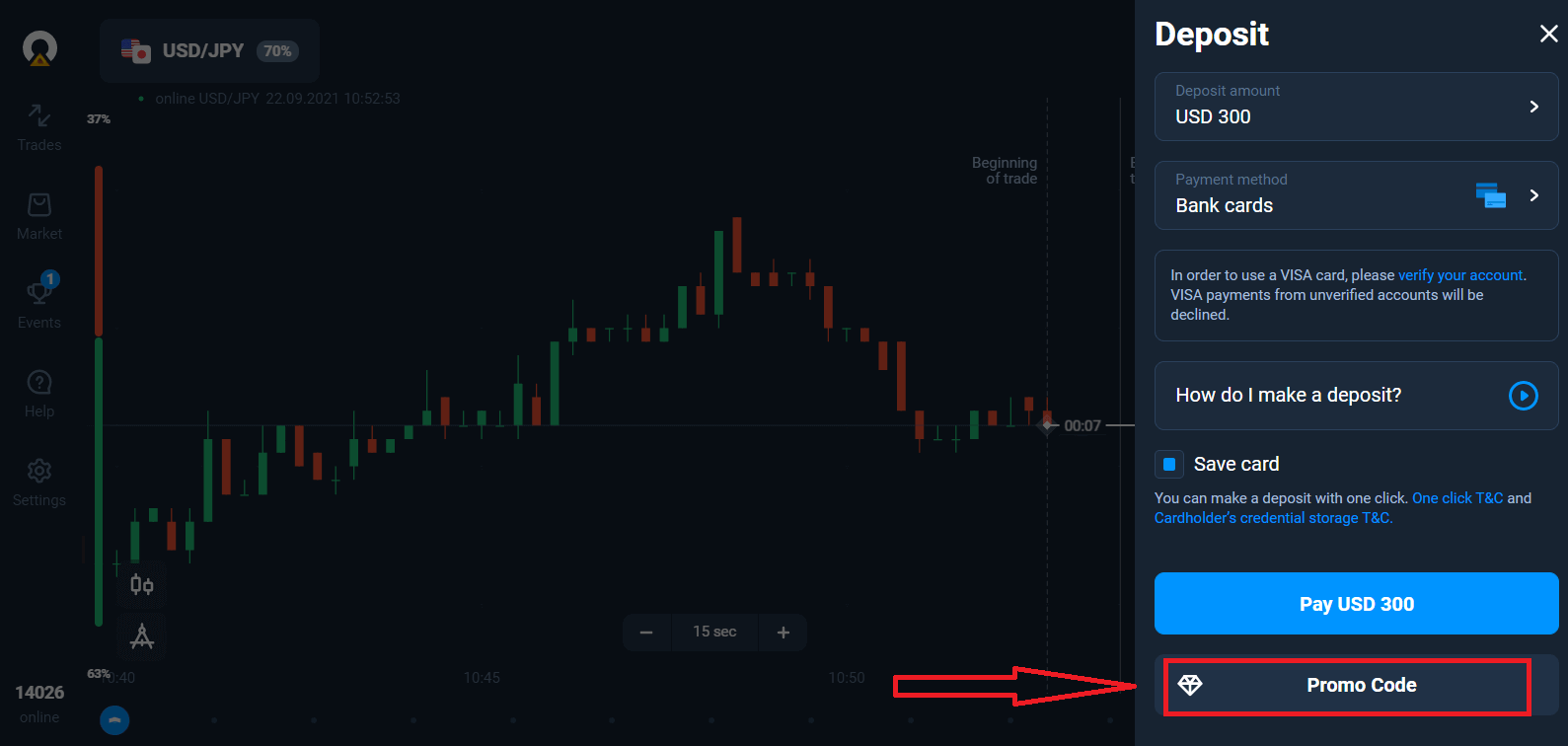
If you top up with a bank card, you can store your card details to make one-click deposits in the future.
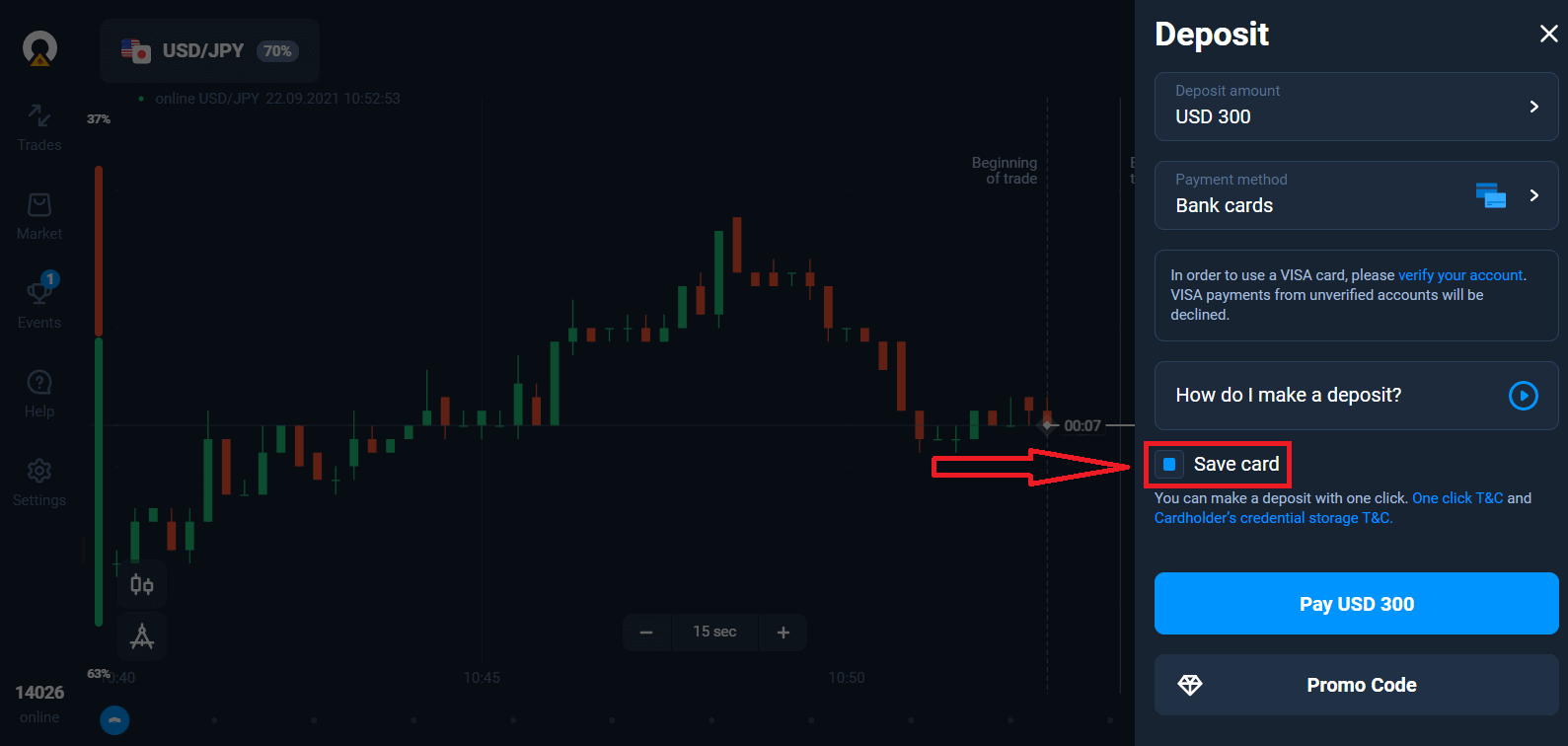
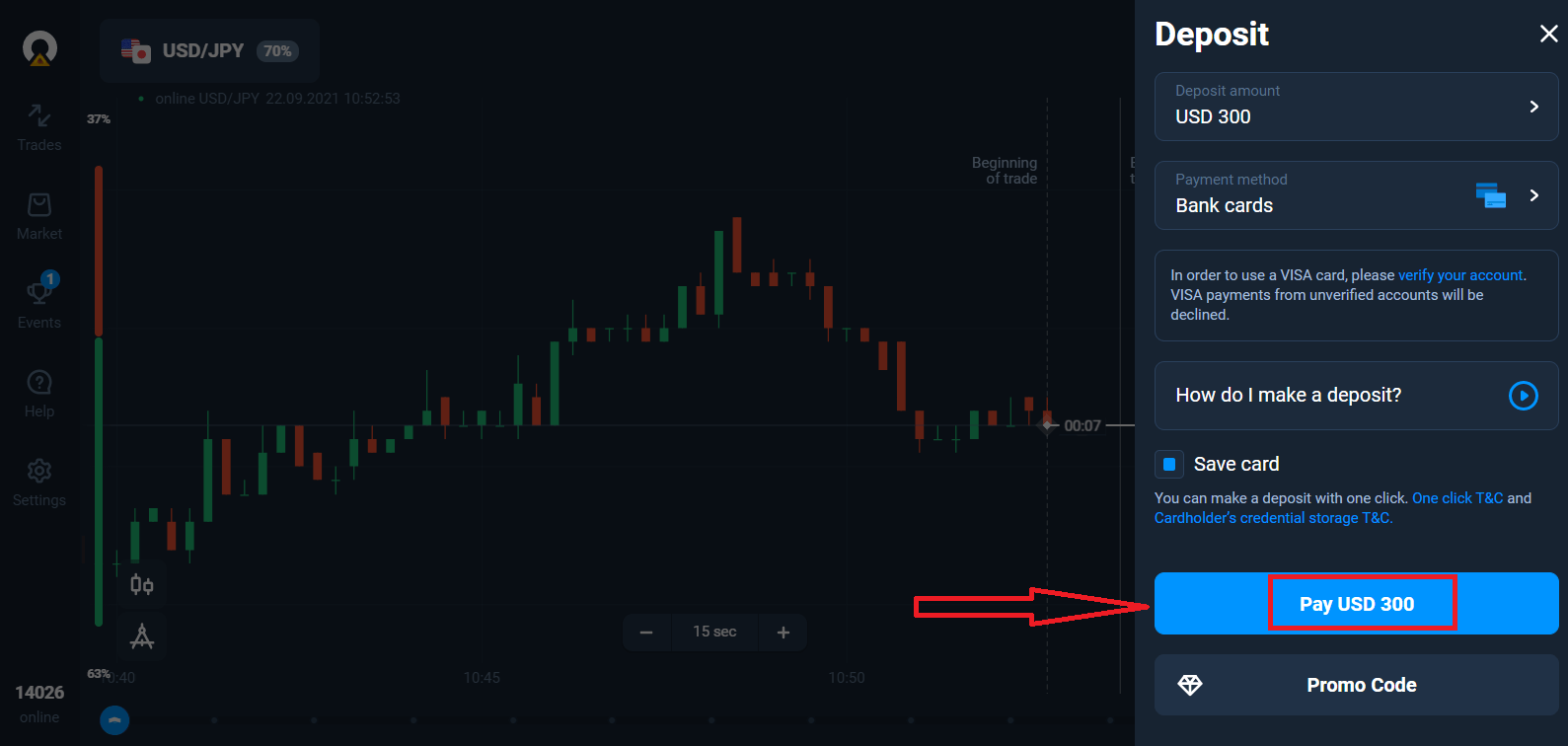
Click "Pay..." blue button.
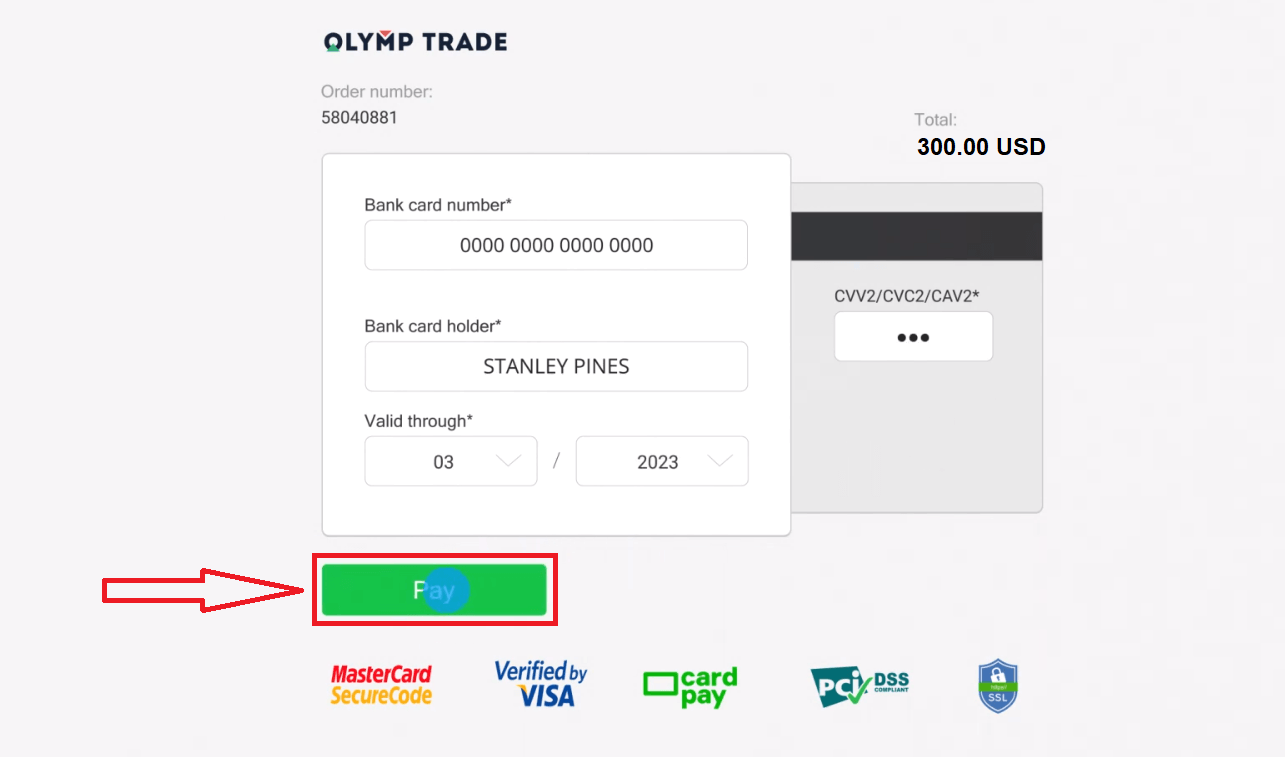
Enter the card data and click "Pay".
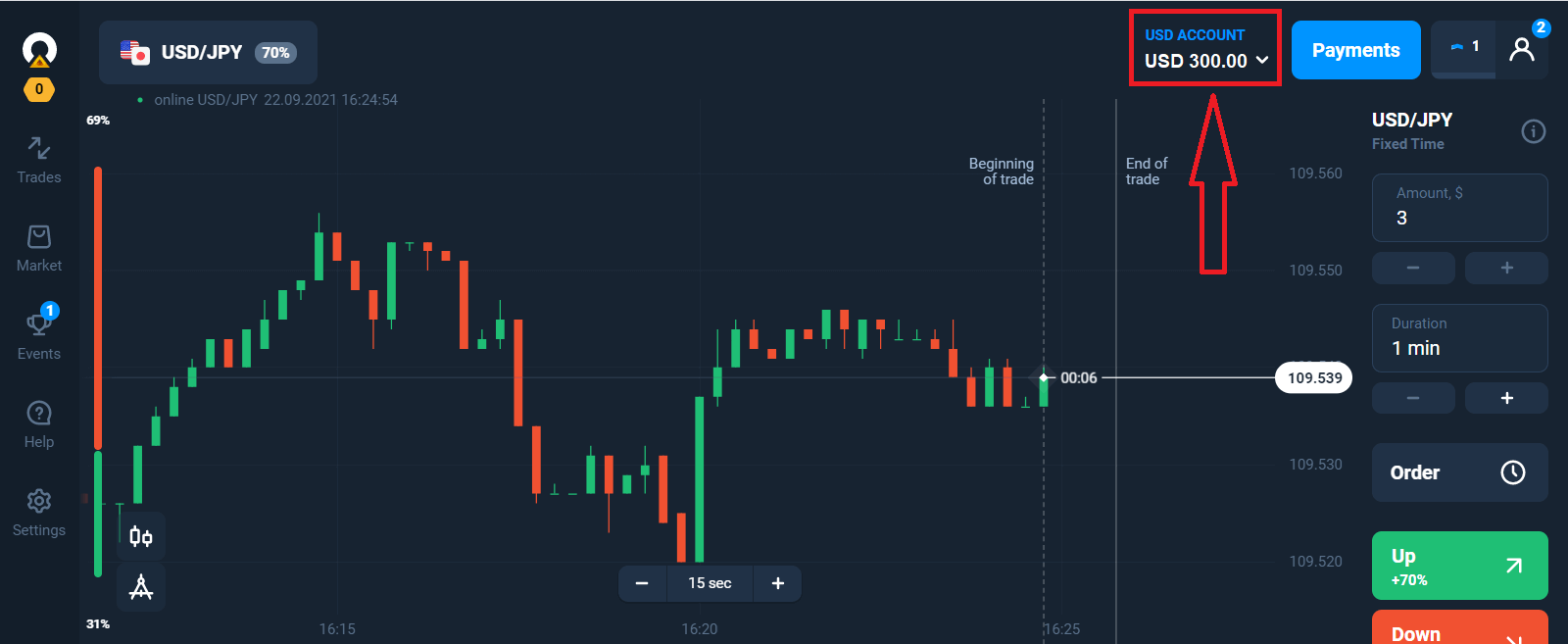
Now you can trade on Real Account.
Deposit using Mobile device
Click the "Deposit" button.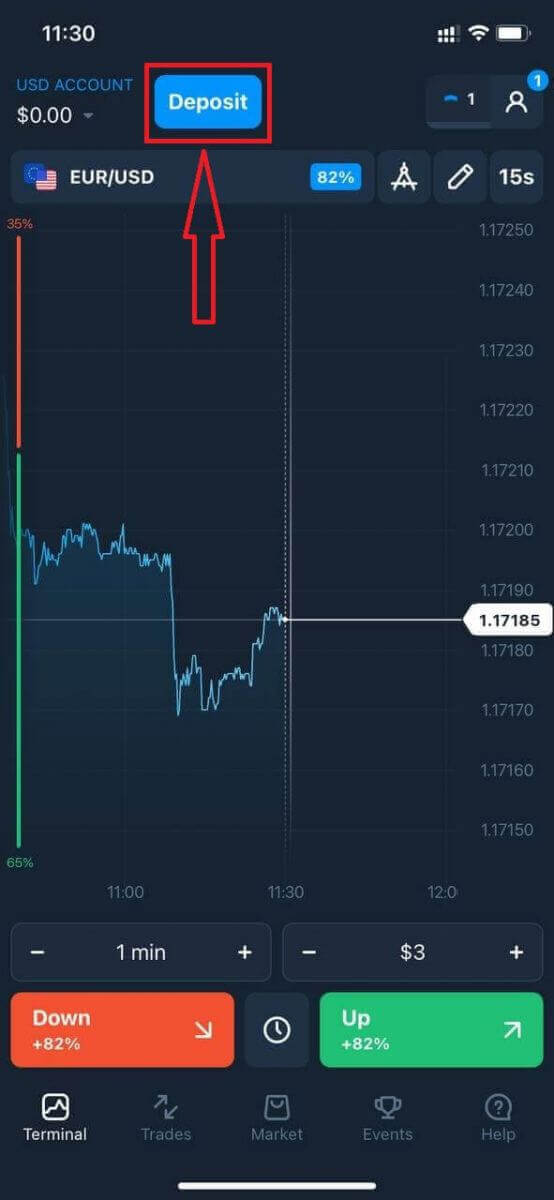
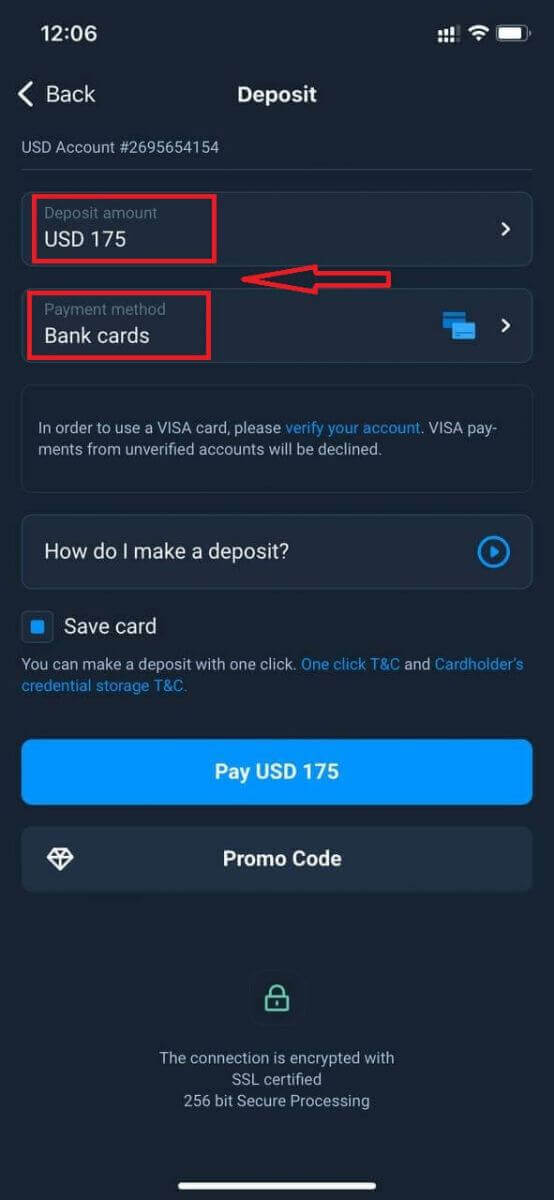
Select a payment method and enter the amount of your deposit. The minimum deposit amount is just $10/€10. However, it may vary for different countries.
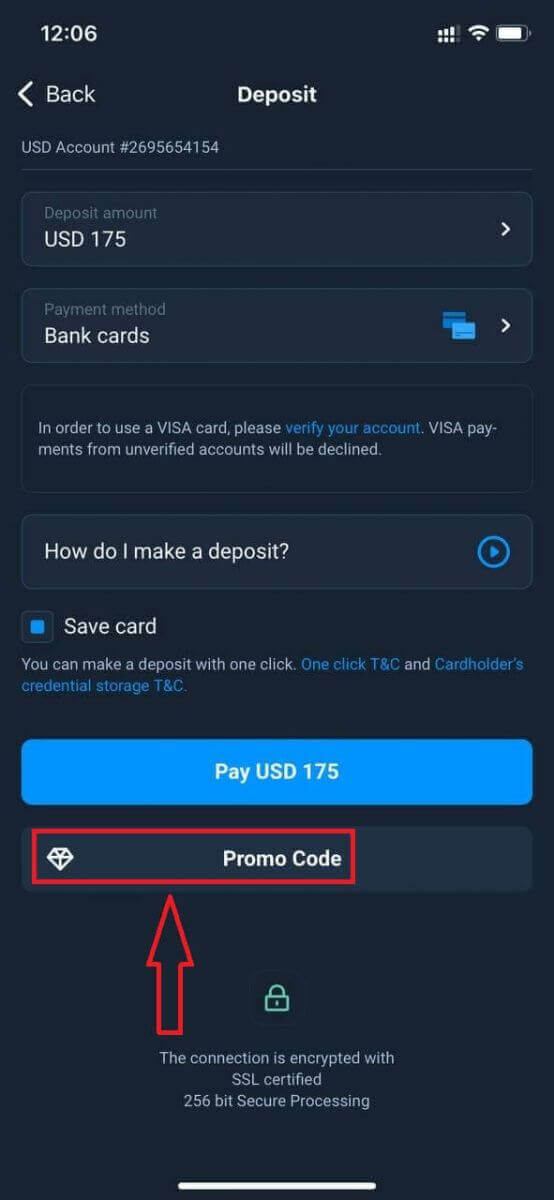
The system may offer you a deposit bonus, take advantage of the bonus to increase the deposit.
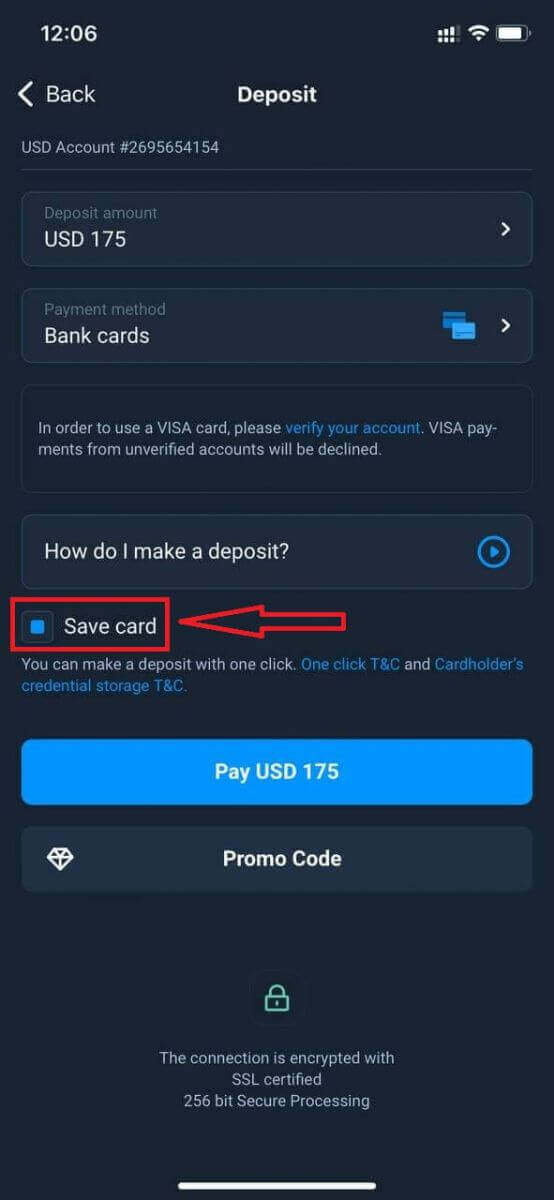
If you top up with a bank card, you can store your card details to make one-click deposits in the future.
Click "Pay...".
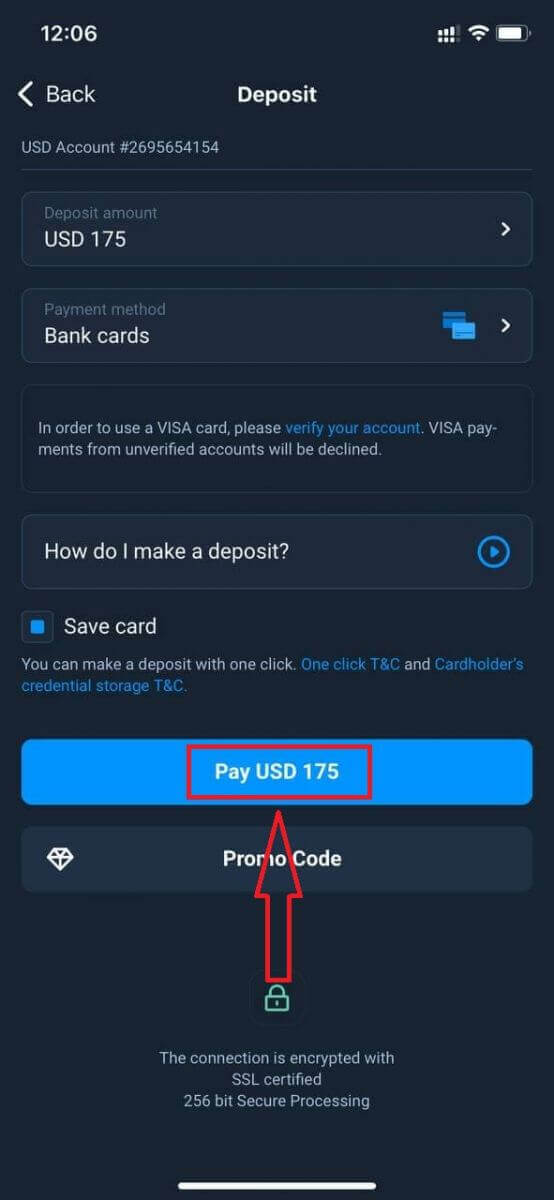
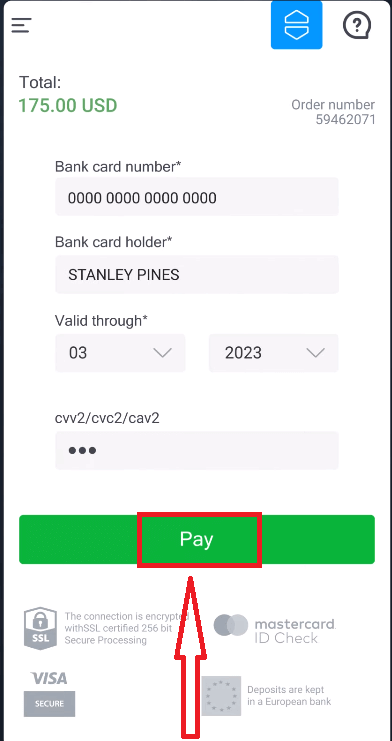
Enter the card data and click "Pay" green button.
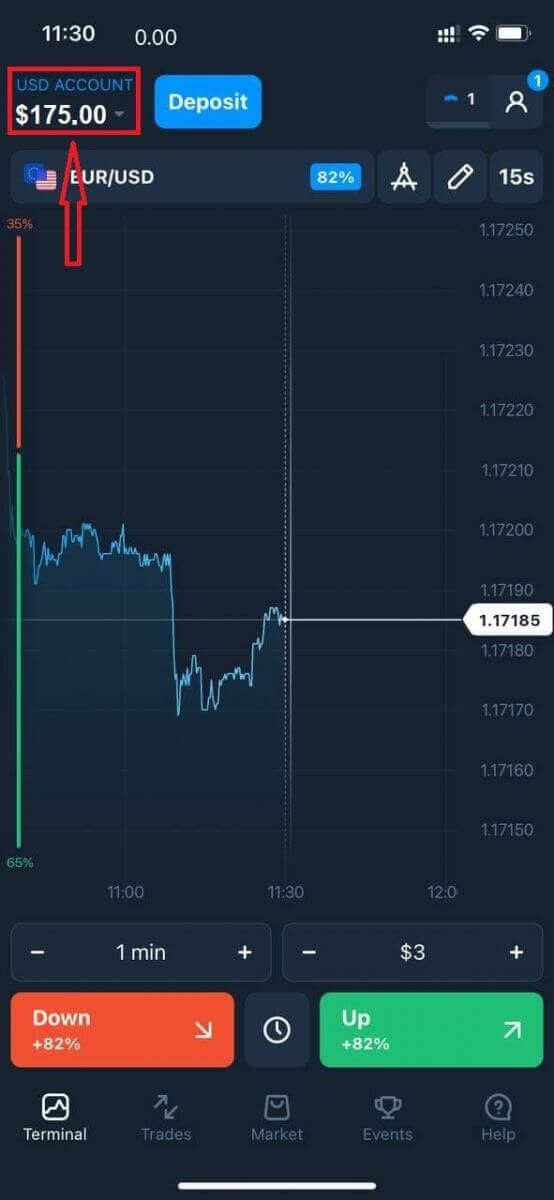
Now You can trade on Real Account.
Frequently Asked Questions (FAQ)
When will the funds be credited?
The funds are usually credited to trading accounts fast, but sometimes it can take from 2 to 5 business days (depending on your payment provider.)If the money has not been credited to your account right after you make a deposit, please wait for 1 hour. If after 1 hour there is still no money, please wait and check again.
I Transferred Funds, but They Weren’t Credited to My Account
Make sure the transaction from your side has been completed.If the funds transfer was successful from your side, but the amount was not credited yet to your account, please contact our support team by chat, email, or hotline. You will find all contact information in the "Help" menu.
Sometimes there are some issues with the payment systems. In situations like this, funds are either returned to the payment method or credited to the account with a delay.
Do you charge a brokerage account fee?
If a customer has not made trades in live account or/and has not deposited/withdrawn funds, a $10 (ten US dollars or its equivalent in the account currency) fee will be monthly charged to their accounts. This rule is enshrined in non-trading regulations and KYC/AML Policy.If there are not enough funds in the user account, the amount of the inactivity fee equates to the account balance. No fee will be charged to a zero-balance account. If there is no money in the account, no debt is to be paid to the company.
No service fee is charged to the accont provided that the user makes one trading or non-trading transaction (funds deposit/withdrawal) in their live account within 180 days.
The history of inactivity fees is available in the “Transactions” section of the user account.
Do you charge a fee for making a deposit/withdrawing funds?
No, the company covers the costs of such commissions.How can I get a bonus?
To receive a bonus, you need a promo code. You enter it when funding your account. There are several ways to get a promo code:– It may be available on the platform (check the Deposit tab).
– It may be received as a reward for your progress on Traders Way.
– Also, some promo codes may be available in the brokers official social media groups/communities.
Bonuses: Terms of Use
The bonus funds in your account sum up if you apply a bonus promo code when depositing additional money.
Example: In his account, a trader has $100 (their own funds) + $30 (bonus funds). If s/he adds $100 to this account and applies a bonus promo code (+ 30% to the deposit amount), the account balance will be: $200 (own money) + $60 (bonus) = $260.
Promo codes and bonuses can have unique terms and conditions of use (validity period, bonus amount).
Please note that you cannot use the bonus money to pay for the Market features.
What happens to my bonuses if I cancel a funds withdrawal?
After making a withdrawal request, you may continue trading using your total balance until the requested amount is debited from your account.While your request is being processed, you may cancel it by clicking the Cancel Request button in the Withdrawal area. If you cancel it, both your funds and bonuses will remain in place and available for use.
If the requested funds and bonuses are already debited from your account, you may still cancel your withdrawal request and recover your bonuses. In this case, contact Customer Support and ask them for assistance.
How to Withdraw Money from Olymptrade Mexico
The Olymptrade platform strives to meet the highest quality standards of carrying out financial transactions. What is more, we keep them simple and transparent.The funds withdrawal rate has increased tenfold since the company was founded. Today, more than 90% of requests are processed during one trading day.
However, traders often have questions about the funds withdrawal process: which payment systems are available in their region or how they can speed up the withdrawal.
For this article, we collected the most frequently asked questions.
What Payment Methods Can I Withdraw Funds To?
You can only withdraw funds to your payment method.If you have made a deposit using 2 payment methods, a withdrawal to each of them should be proportional to the payment amounts.
Do I Need to Provide Documents to Withdraw Funds?
There’s no need to provide anything in advance, you will only have to upload documents upon request. This procedure provides additional security for the funds in your deposit.If your account needs to be verified, you will receive an instruction on how to do it by email.
How do I Withdraw Money from Olymptrade
Withdrawal using Mobile Device
Go to your platform user account and select "More".
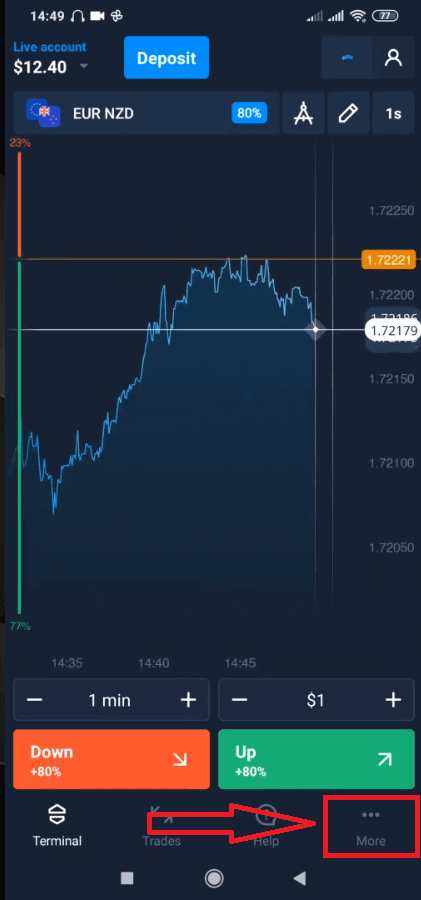
Select "Withdraw".
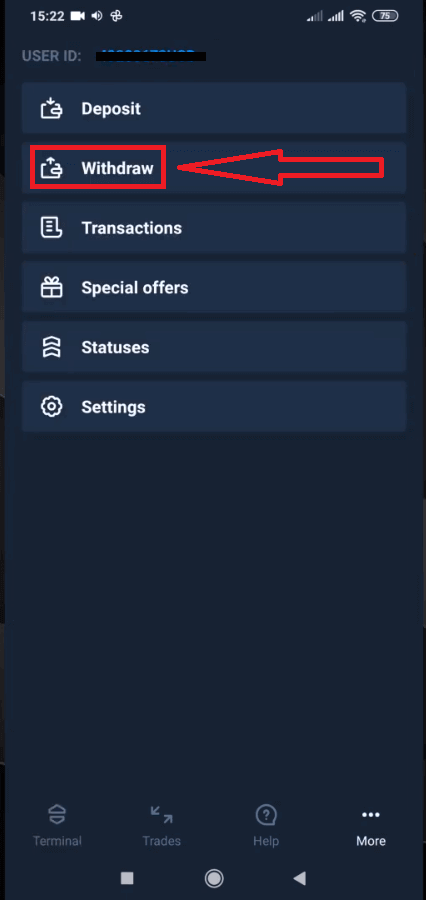
It will lead you to a special section on the Olymptrade website.
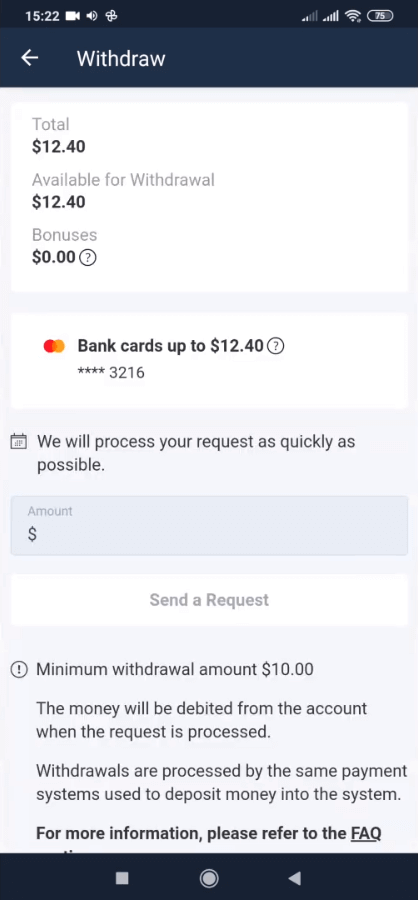
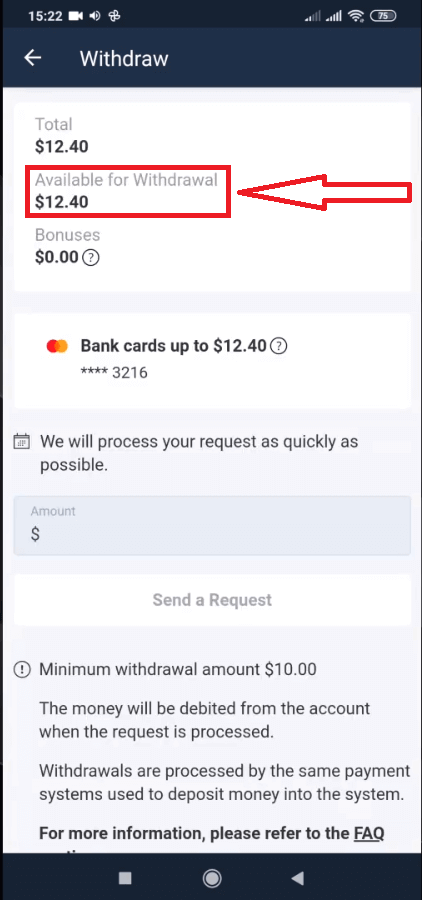
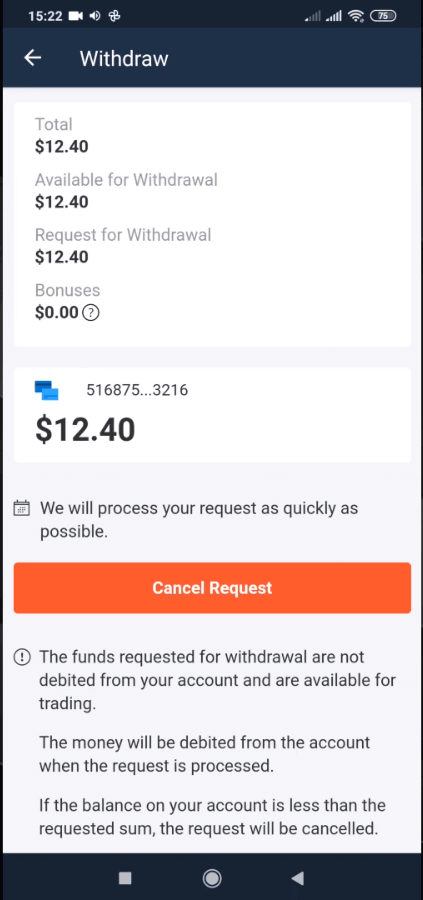
In the “Available for withdrawal” block you will find the information about how much you can withdraw.
Select the amount. The minimum withdrawal amount is $10/€10/R$50, but it may vary for different payment systems. Click “Send a Request”.
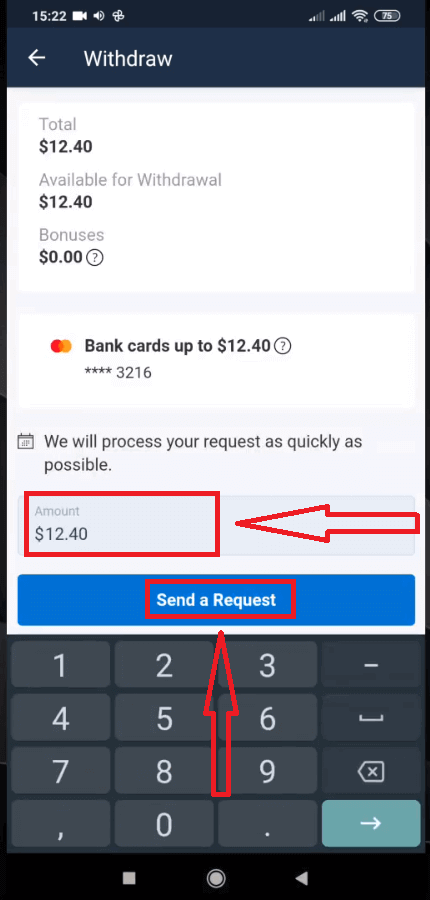
Wait a few seconds, you will see your request.
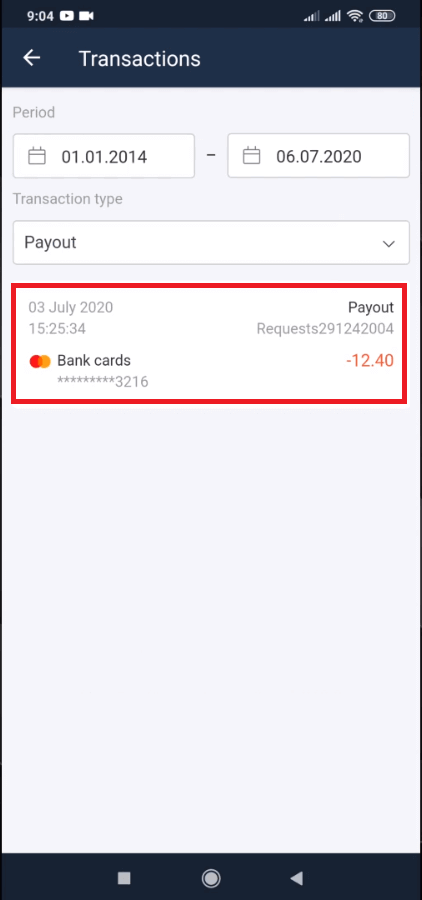
Check your payment in Transactions.
Withdrawal using Desktop
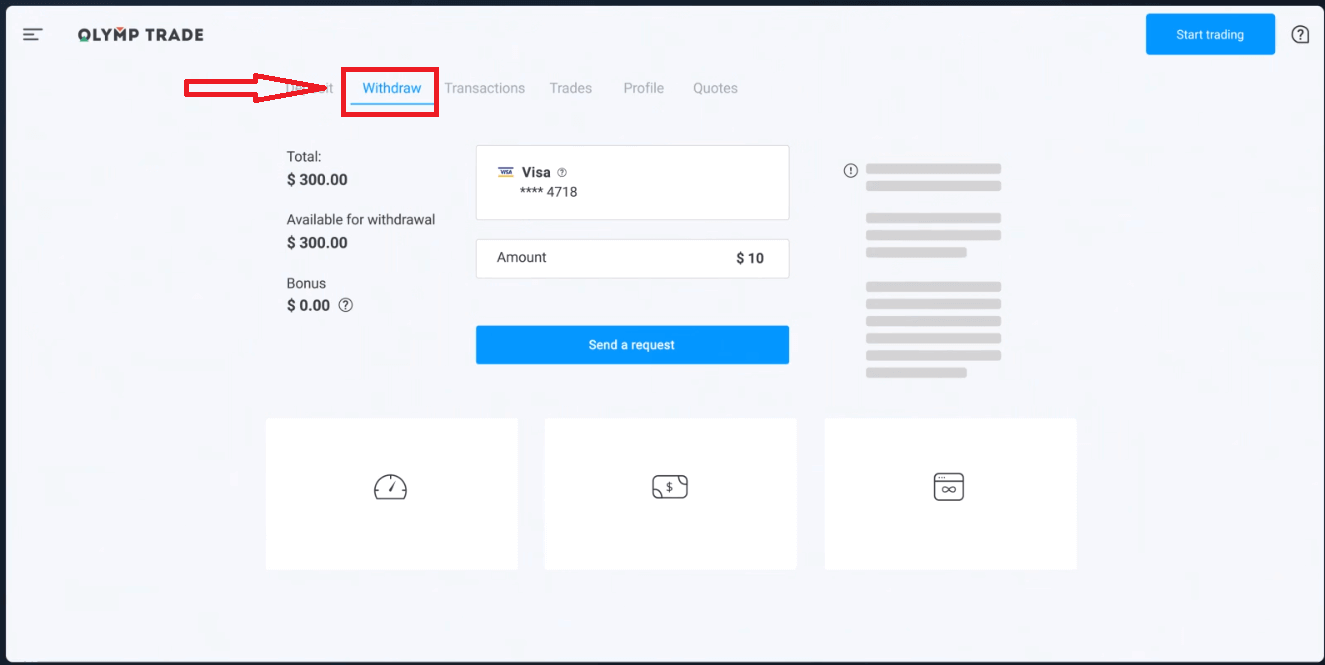
Go to your platform user account and click the "Payments" button.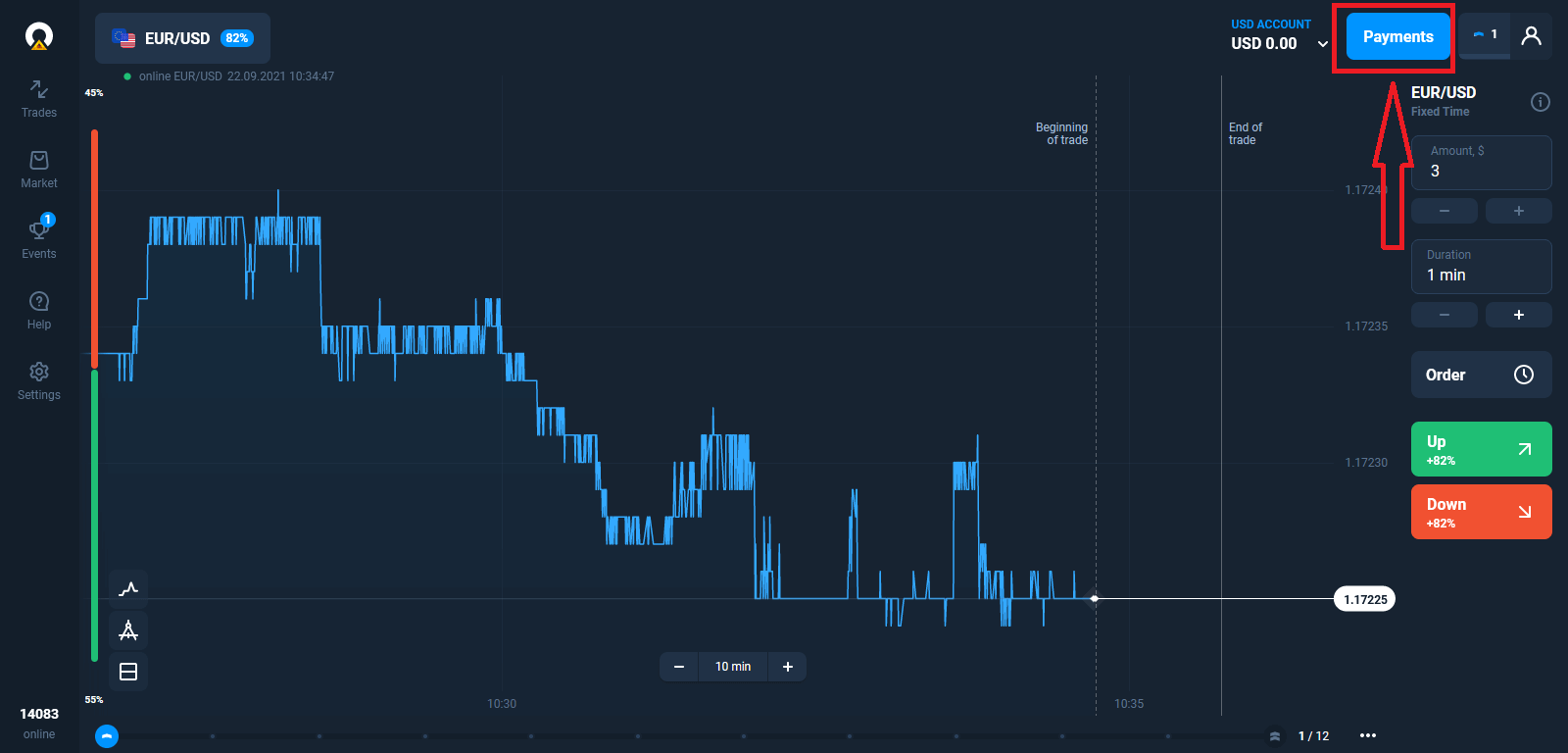
Select “Withdraw”.
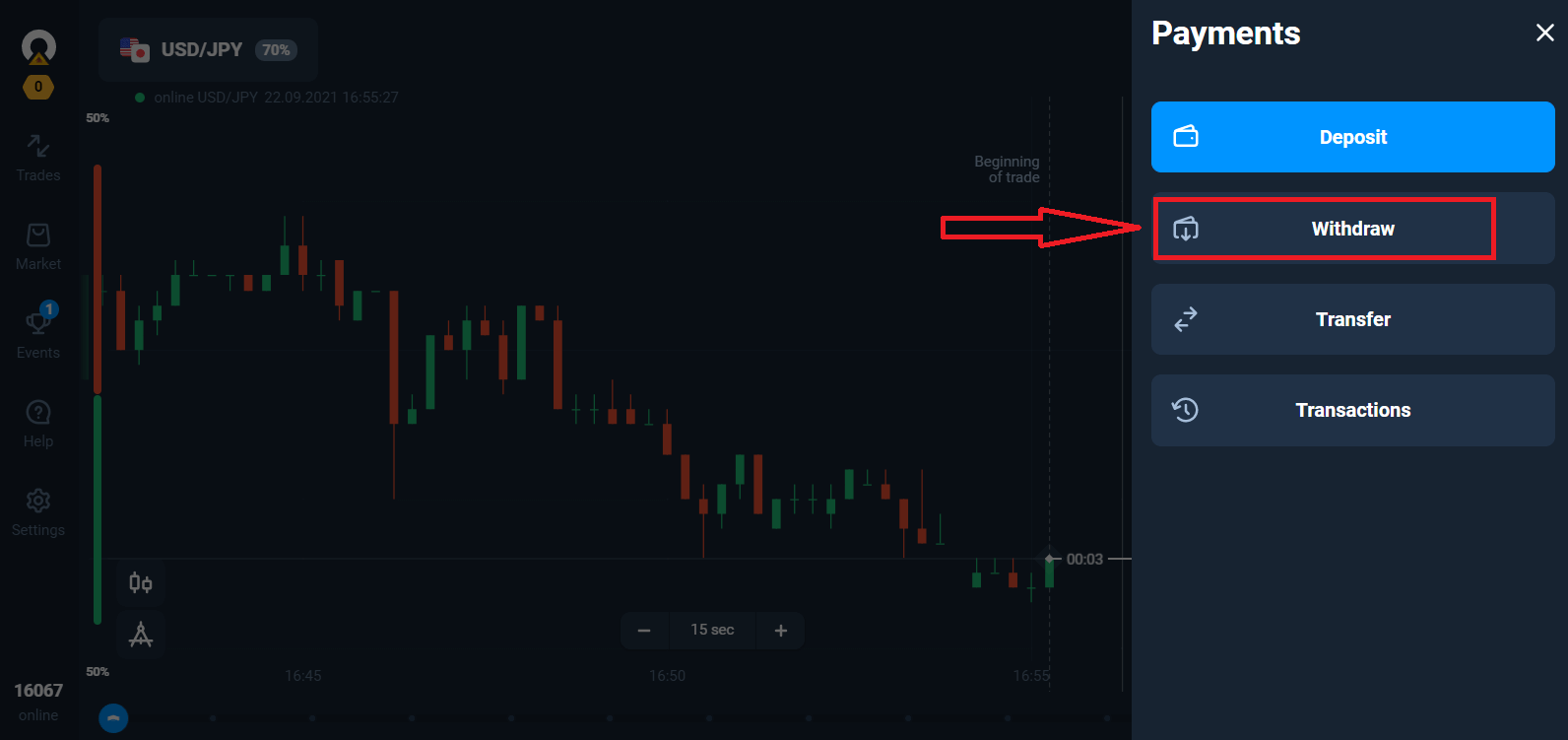
It will lead you to a special section on the Olymptrade website.
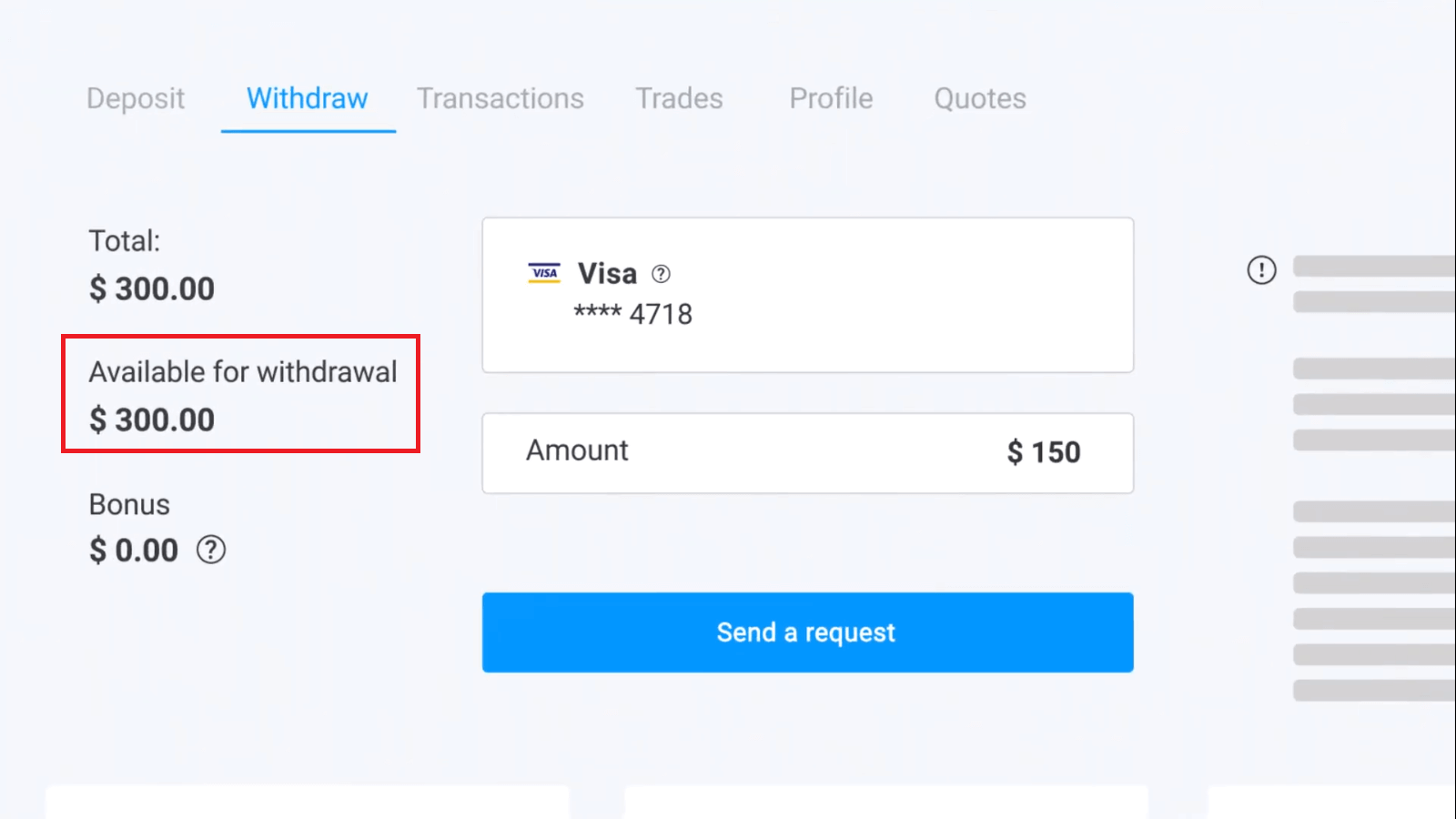
In the “Available for withdrawal” block you will find the information about how much you can withdraw.
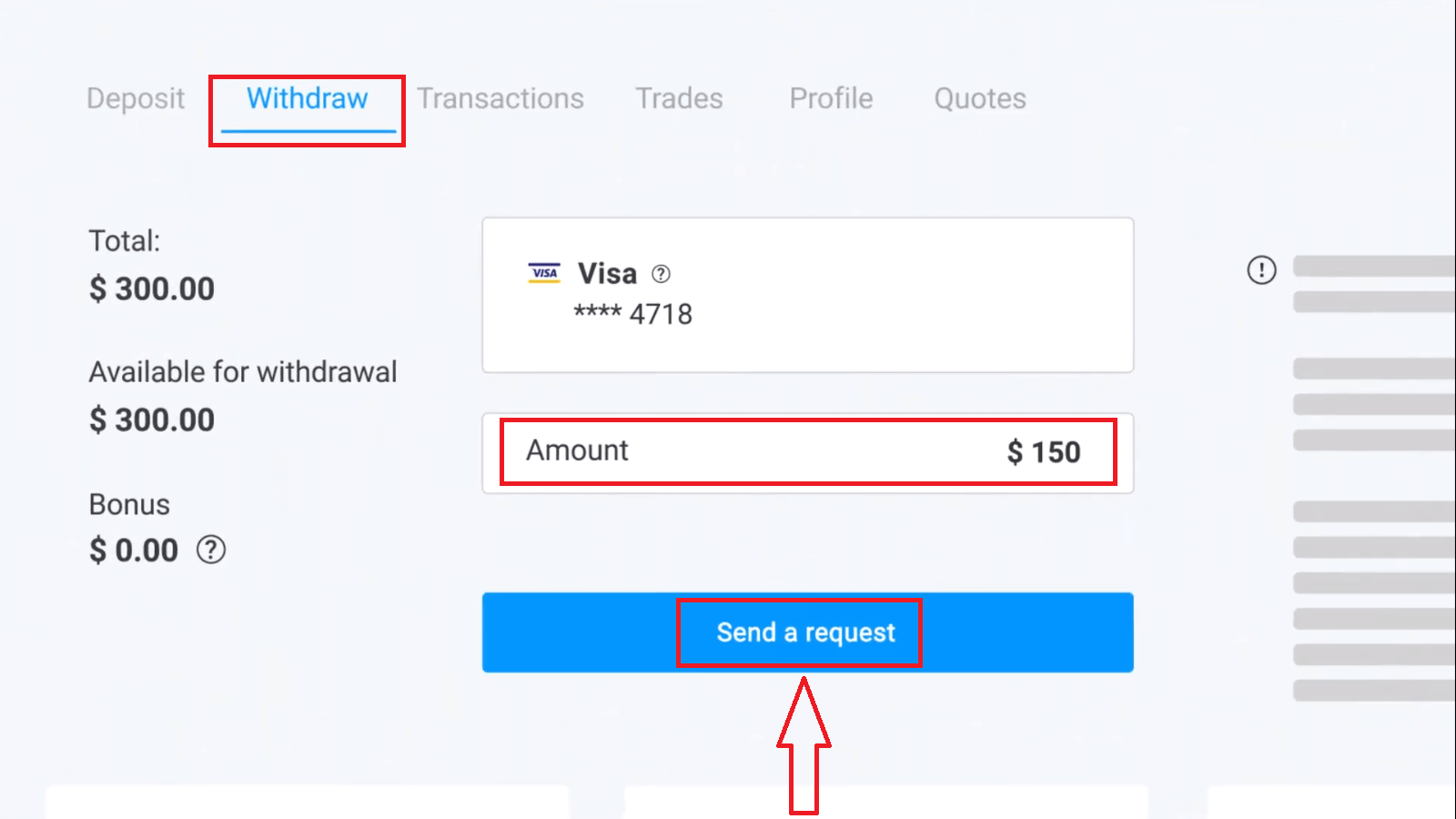
Select the amount. The minimum withdrawal amount is $10/€10/R$50, but it may vary for different payment systems. Click “Send a Request”.
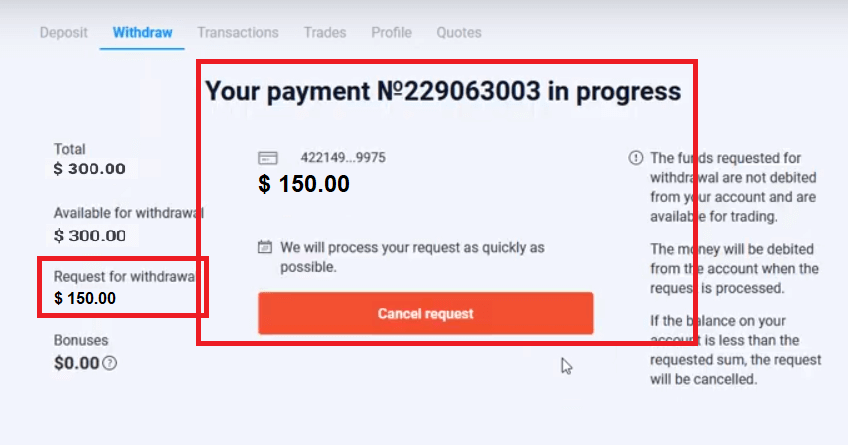
Wait a few seconds, you will see your payment.
Frequently Asked Questions (FAQ)
What Should I Do If the Bank Rejects My Withdrawal Request?
Don’t worry, we can see that your request has been rejected. Unfortunately, the bank doesn’t provide the reason for the rejection. We will send you an email describing what to do in this case.
Why Do I Receive the Requested Amount in Parts?
This situation may arise because of the payment systems’ operational features.You have requested a withdrawal, and you only got part of the requested amount transferred to your card or e-wallet. The withdrawal request status is still “In process”.
Don’t worry. Some banks and payment systems have restrictions on the maximum payout, so a larger amount can be credited to the account in smaller parts.
You will receive the requested amount in full, but the funds will be transferred in a few steps.
Please note: you can only make a new withdrawal request after the previous one has been processed. One cannot make several withdrawal requests at once.
How Long Do You Process Withdrawal Requests
We are doing our best to process all our clients requests as fast as possible. However, it may take from 2 to 5 business days to withdraw the funds. The duration of the request processing depends on the payment method you use.
Why Do You Credit a Deposit Straight off but Take Time to Process a Withdrawal?
When you top up, we process the request and credit the funds to your account straight off.Your withdrawal request is processed by the platform and your bank or payment system. It takes more time to complete the request due to an increase of counterparties in the chain. Besides, each payment system has own withdrawal processing period.
On average, funds are credited to a bank card within 2 business days. However, it may take some banks up to 30 days to transfer the funds.
E-wallet holders receive the money once the request is processed by the platform.
Don’t worry if you see the status saying “Payout has been successfully made” in your account but you haven’t received your funds.
It means that we have sent the funds and the withdrawal request is now processed by your bank or payment system. The speed of this process is out of our control.
How do I Withdraw Funds to 2 Payment Methods
If you topped up with two payment methods, the amount of the deposit you want to withdraw should be proportionally distributed and sent out to these sources.For example, a trader has deposited $40 in their account with a bank card. Later, the trader made a deposit of $100 using the Neteller e-wallet. After that, he or she increased the account balance to $300. This is how the deposited $140 can be withdrawn: $40 should be sent to the bank card $100 should be sent to the Neteller e-wallet Please note that this rule applies only to the amount of funds one has deposited. The profits can be withdrawn to any payment method without restrictions.
Please note that this rule applies only to the amount of funds one has deposited. The profits can be withdrawn to any payment method without restrictions.
We have introduced this rule because as a financial institution, we must comply with international legal regulations. According to these regulations, a withdrawal amount to 2 and more payment methods should be proportional to the deposit amounts made with these methods.
Why am I asked to provide my e-wallet details if I want to withdraw funds to my bank card?
In some cases, we cannot send out amounts that exceed the initial deposit made using a bank card. Unfortunately, banks do not disclose their reasons for rejection. If this situation arises, we will send you detailed information by email, or contact you by phone.Empowering Traders: Streamlining Deposit and Withdrawal Processes on Olymptrade in Mexico
In conclusion, Olymptrade serves as a reliable ally for Mexican traders, offering a user-friendly platform for managing financial transactions with ease. By adhering to the guidelines outlined in this guide, traders can navigate the complexities of depositing and withdrawing funds on Olymptrade with confidence and efficiency. With its commitment to security, transparency, and customer satisfaction, Olymptrade continues to pave the way for traders in Mexico to achieve their financial goals, one transaction at a time. FAQs
Olymptrade's minimum deposit is typically $10 USD or the MXN equivalent shown on the deposit screen; some local payment providers (OXXO, SPEI, e‑wallets) may set higher minimums, so check the payment method form before confirming your transaction.
Log in, open the Deposit panel, pick SPEI or OXXO, enter the amount and follow the payment provider's instructions—SPEI requires your bank transfer details and usually clears faster while OXXO generates a barcode to pay in-store; keep receipts or confirmation codes and upload any requested verification to avoid holds.
Common causes include card declines, failed 3D Secure checks, insufficient funds, bank blocks on international or merchant categories, mismatched account details, or pending KYC verification. Check the bank transaction status, save payment references, contact both your bank and Olymptrade support, and be ready to upload requested documents to resolve holds.
Typical withdrawal verification requires a government ID (passport or national ID), a recent proof of address (utility bill or bank statement), and proof of the payment method used (card copy showing first 6/last 4 digits or a bank statement with the deposit). Names must match the trading account owner and documents should be clear and current.
Withdrawal timing depends on the payout method: e‑wallets are usually fastest (1–3 business days), bank transfers and SPEI take several business days, and card refunds can take longer (up to a couple of weeks) depending on the card issuer. Olymptrade typically processes requests after verification within a few business days, but banks or payment providers may apply fees or hold times, so check limits and possible charges before requesting a payout.