Olymp Trade Deposit from India: Payment Methods & Limits
Writen By

Online Trading Platform Researcher and Guide Writer
Researches broker platforms and trading account Systems.
Funding a trading account from India involves understanding local payment rules, currency conversion, and processing delays that can block or slow transfers. Indian traders frequently run into bank restrictions on cross-border card and netbanking payments, and some electronic wallets or UPI flows require extra verification steps. You should confirm whether INR deposits are accepted or converted to foreign currency, which methods are available in your region, and any minimums and limits that apply before initiating a transfer to avoid failed payments and unexpected charges.
You’ll find practical, platform-specific deposit guidance for Olymp Trade users in India: supported payment options, typical minimum deposit amounts, processing and settlement times, currency and conversion notes, and quick troubleshooting steps if a transfer fails. The section also covers common fees, how deposits interact with account verification and withdrawal eligibility, and best practices for using personal payment methods and keeping transaction receipts to speed up any support requests.
You’ll find practical, platform-specific deposit guidance for Olymp Trade users in India: supported payment options, typical minimum deposit amounts, processing and settlement times, currency and conversion notes, and quick troubleshooting steps if a transfer fails. The section also covers common fees, how deposits interact with account verification and withdrawal eligibility, and best practices for using personal payment methods and keeping transaction receipts to speed up any support requests.

How Сan You Deposit your Olymp Trade Account in India?
Today, traders can use 9 payment methods when they want to make a deposit or funds withdrawal. All of these methods are safe and well-known. We recommend using several methods to have a fallback option.| Minimum deposit/withdrawal amount | Method type | |
| Bank cards (Visa/Mastercard) | $10 | Bank transfer from a card |
| Skrill | $10 | Electronic payment system |
| Neteller | $10 | Electronic payment system |
| WebMoney | $10 | Electronic payment system |
| Net banking | $10 | Bank transfer |
| UPI | $10 | Instant real-time payment system facilitating inter-bank transactions |
| AstroPay Card | $10 | Virtual bank card issuing |
| GlobePay | $50 | Electronic payment system |
| Bitcoin | $40 | Cryptocurrency |
How Do I Deposit My Olymp Trade Account via Skrill?
Skrill is an international payment system. To deposit into your account, follow the steps below:- Step 1: Log in.
- Step 2: Deposit into your Skrill wallet. At the same time, you can use bank cards, cryptocurrency, any other electronic system (for example, Neteller), or transfer funds from your bank account.
- Step 3: Complete the depositing process via Skrill.
How Do I Deposit my Olymp Trade account via Neteller?
Neteller is another popular payment system. The main benefit of Neteller and Skrill is the ease of use. Users take the same steps when they top up through Neteller or Skrill:
- Step 1: Register your Neteller wallet.
- Step 2: Deposit via a bank transfer, credit card, bitcoin, or other electronic systems.
- Step 3: Deposit your Olymp Trade account via Neteller
Visa/Mastercard Bank Cards
Visa and Mastercard bank cards are the most popular method of making a deposit and withdrawing funds into/from your Olymp Trade account. To use it, you must have a valid bank card. Make sure there are enough funds to deposit the platform account. The minimum deposit or withdrawal amount is $10.
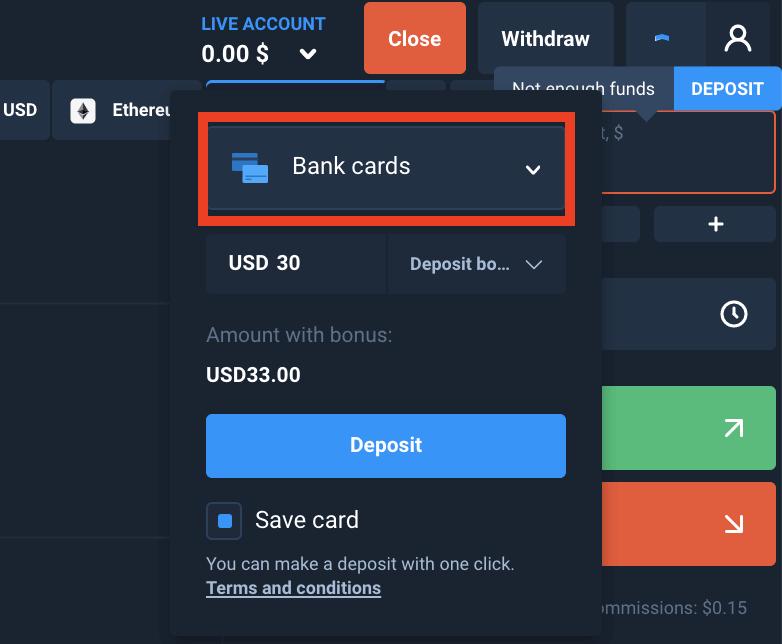
- Step 1: Click “Deposit.” Select the “Bank Cards” method, and enter the deposit amount. If the amount exceeds $30, you can receive an additional bonus.
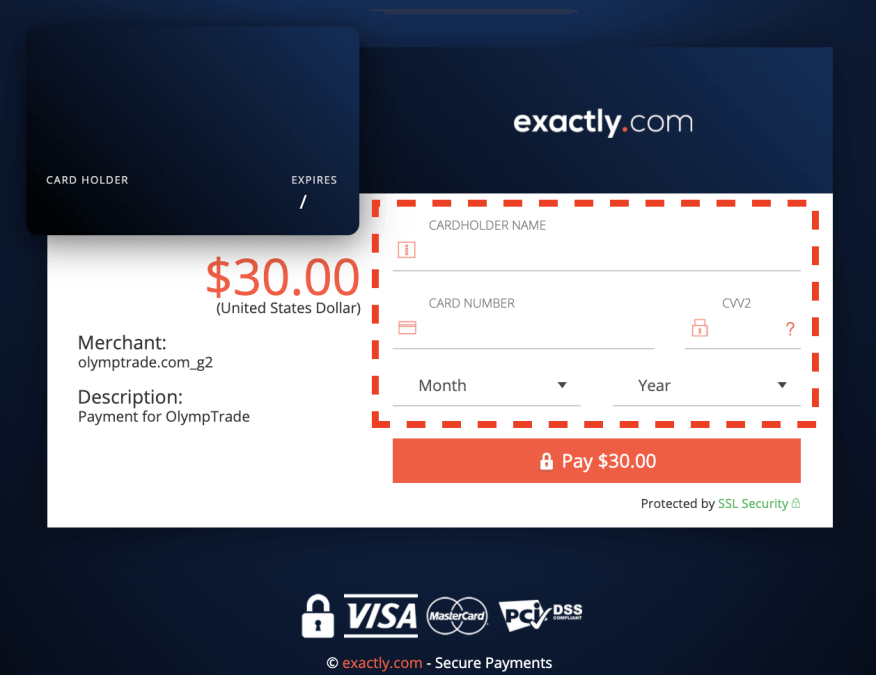
- Step 2: Enter our bank card details: its number, CVV code, cardholder name (exactly as it appears on the card), and expiration date.
- Step 3: If you provide the correct information, you will be redirected to the payment confirmation page. After that, the money will go to your Olymp Trade account.
Cant Deposit Your Olymp Trade Account with a Bank Card in India?
Problems can arise due to reasons beyond the control of the trading platform. In such a situation, we recommend:- Try again later.
- Please contact the issuing bank to clarify the reason for this error.
- Or contact Support. The specialists will help you.
- Sign up for one of these systems. Along with an account, you create a digital wallet.
- Top up your wallet with your credit card.
- Transfer money from the electronic payment system to the trading platform.
I want to Deposit Olymp Trade from a Bank Account. How Can I Do It?
If you use online banking services, you can use Net Banking. In this case, you will need to do the following:
- Select “Net Banking” on the platform
- Enter personal data (first name, last name, phone number), and the deposit amount.
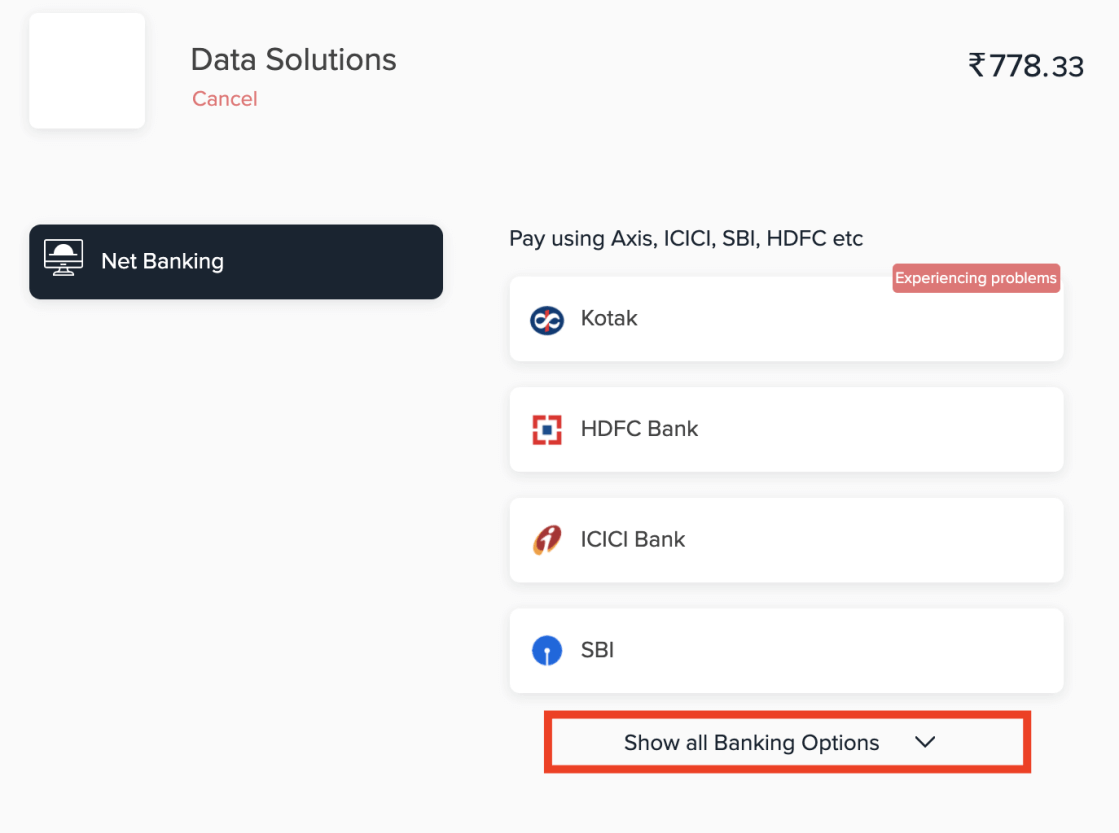
- A list of available banks will appear. Choose your option.
- You will be redirected to the bank website. Log in and complete the transfer.
Promo Codes and Bonuses for Topping Up the Account
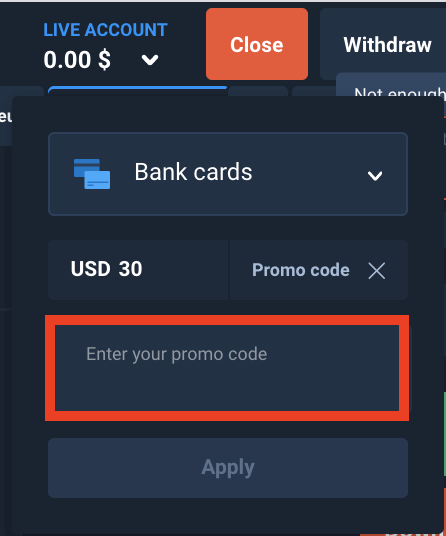
Regardless of the chosen method, you can use a promo code to receive a bonus and other benefits.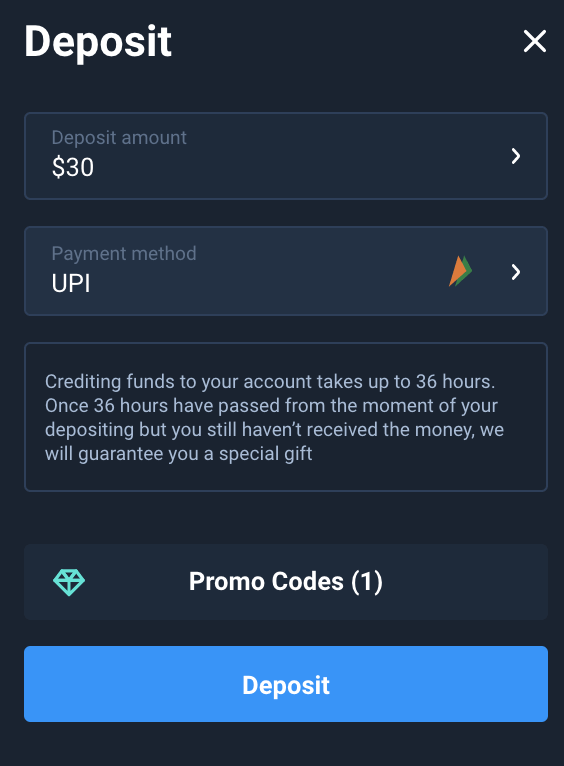
Another way to get a bonus is by using a promo code when depositing funds into your account. If you have such a code, don’t forget to enter it in the corresponding field.
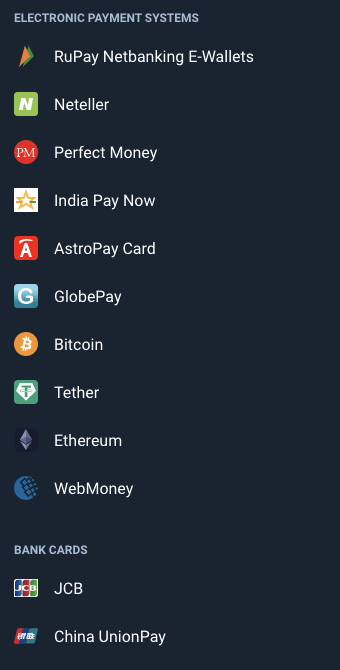
The Complete List of Methods for Making a Deposit on Olymp Trade from India
The number of payment systems in use has constantly been growing. The up-to-date list is always available in the Deposit menu.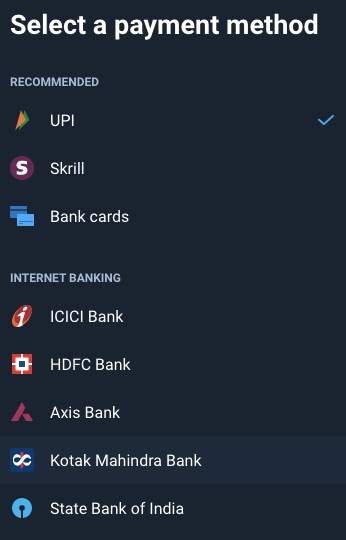
If you have any questions concerning depositing and withdrawal of funds into/from the platform, contact the Support Service. They will help you.
FAQs
Common options include international debit/credit cards, netbanking, UPI and some e-wallets; availability depends on the payment gateway shown in your account. Availability can change by region, so use a payment method registered in your name to avoid verification holds.
Olymp Trade’s standard minimum is typically around $10 (or equivalent in INR), but the exact minimum varies by payment method and currency conversion. The deposit dialog will show the required minimum before you confirm.
Log in, open the Deposit section, select a payment method listed for Indian users, choose the currency and enter an amount above the minimum, then complete the bank/UPI/card authorization (OTP or 3D Secure). Save transaction IDs and receipts, wait for platform confirmation, and contact support with proof if funds don’t appear within the displayed timeframe.
Check your bank or payment app for declines, OTP failures, daily limits, or holds; confirm you used the correct card/account and enough funds. Verify whether the platform requires additional KYC before crediting funds. If issues persist, collect the transaction ID/screenshots and contact Olymp Trade support and your payment provider for investigation and potential refunds.
Yes. Payment providers and banks may apply fees and daily/monthly limits, and deposits may be converted to another currency. Olymp Trade may require identity and proof-of-payment verification to clear deposits and enable withdrawals. Always use personal payment methods, keep receipts, and review fees and conversion rates before confirming a transfer.